What Is a Smart Lectern and How Does It Work?
A Smart Lectern is more than a podium with a screen. It is an integrated teaching and presentation station designed to connect speakers, displays, cameras, microphones, and networked content. In a classroom, the presenter may tap a control panel, select a laptop input, adjust the room volume, and share slides within seconds. That distinction matters. Traditional lecterns often require separate remotes, cables, and control boxes. A Smart Lectern brings these functions into one organized workspace.
How does it work? The lectern usually combines a touchscreen interface with a control processor. This processor sends commands to connected devices, such as projectors, interactive displays, document cameras, and audio systems. Some models also support video conferencing, wireless presentation, lecture capture, and device charging. A presenter can switch from a document camera to a presentation computer without reaching behind the desk. Small details matter, including cable access, microphone placement, screen brightness, and clear system labels.
However, smart technology does not automatically improve teaching. Poor setup can produce confusing menus, delayed connections, or distracting notifications. A reliable evaluation should examine usability, accessibility, security, maintenance, and staff training. The best system feels predictable under pressure. It should support the speaker, not compete for attention. Even experienced users may need practice. That is an important limitation to remember. When carefully installed and regularly tested, a Smart Lectern can make presentations more controlled, accessible, and consistent across modern learning spaces.
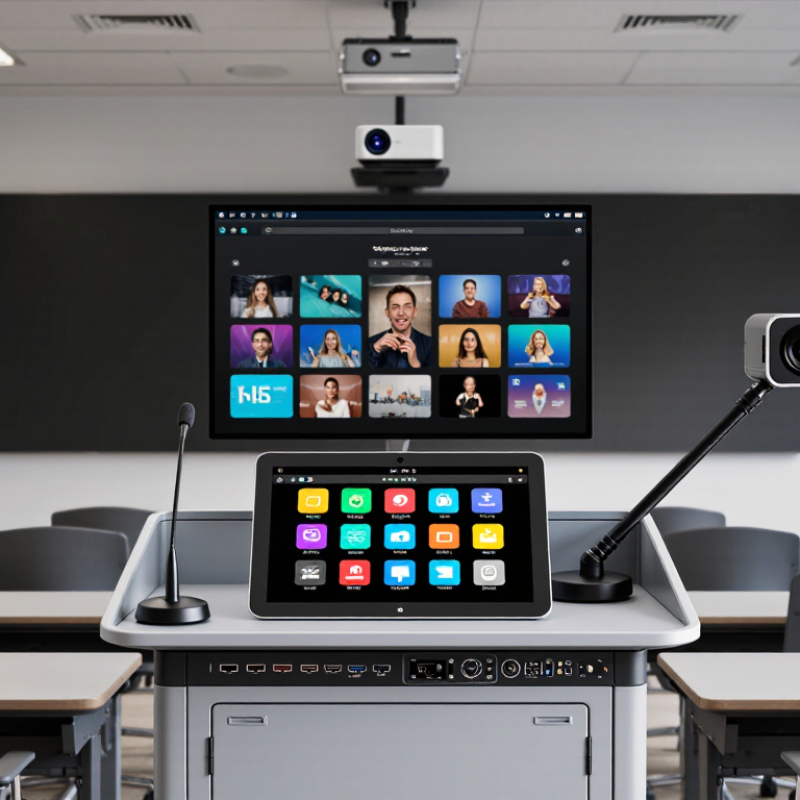
Smart Lectern Definition: Core Functions in Modern AV Systems
What Is a Smart Lectern and How Does It Work?
A smart lectern is an integrated control station for presentations, teaching, and public speaking. It combines a display, microphone, media inputs, connectivity, and room controls in one workspace. Unlike a basic podium, it can manage slides, cameras, lighting, and audio from a central interface. The speaker usually sees a touchscreen, document preview, and control buttons within easy reach.
In modern AV systems, the lectern acts as a practical connection point. A presenter can connect a laptop, display content, adjust microphone volume, and switch video sources without leaving the platform. Built-in signal management sends content to projectors, flat panels, recording systems, or remote meeting platforms.
Some systems also support wireless sharing, automatic camera tracking, and touch annotation. These functions reduce cable changes and help technicians monitor the room from a control interface.
In a real classroom, setup speed matters.
A clear screen and responsive controls can prevent awkward pauses. It is not flawless. Poor network access, unclear icons, or badly placed microphones can still disrupt a session.
I have found that simple control layouts often outperform feature-heavy designs. Accessibility also deserves attention, including readable labels, reachable controls, and suitable microphone height. Security settings should limit unauthorized access to room devices and recorded content. Regular testing remains necessary because software updates, adapters, and room acoustics can change system performance.
Hardware Architecture: 4K Displays, Touch Panels, Cameras, and Microphones
A smart lectern combines a 4K display, touch panel, camera, microphone array, and control computer in one teaching station. The display shows small text, diagrams, and remote participants with sharper detail. However, higher resolution does not automatically improve teaching. Screen brightness, viewing distance, and glare matter more in some rooms.
The touch panel acts as the lectern’s control layer. It can switch sources, annotate slides, adjust volume, and start recording. A capacitive panel feels familiar, but wet fingers and heavy gloves may reduce accuracy. The camera should sit near eye level, not below the presenter’s face. Its image processor needs automatic exposure, framing, and noise reduction. Microphone arrays require beamforming and echo cancellation. Otherwise, air-conditioning noise can overpower speech. Small details matter.
AVIXA’s 2024 Industry Outlook and Trends Analysis projected the professional audiovisual market would approach 422 billion dollars by 2028. This growth reflects stronger demand for integrated presentation systems, not merely larger screens. UNESCO’s 2023 Global Education Monitoring Report also noted that only 16% of countries explicitly guarantee data privacy in education. Therefore, cameras and microphones need physical mute controls, visible recording indicators, encrypted storage, and restricted access. A common design mistake is adding every feature without testing failure conditions. Cables loosen. Touch calibration drifts. The system may still look advanced, yet feel unreliable during a live lesson.
Signal Connectivity: HDMI 2.0 at 18 Gbps, USB, and AV-over-IP
What Is a Smart Lectern and How Does It Work?
A smart lectern combines presentation control, display connectivity, and device charging in one workstation. Its signal system determines whether a lecture feels smooth or frustrating. HDMI 2.0 can carry video at speeds up to 18 Gbps. This supports high-resolution presentations, detailed diagrams, and fluid video playback. However, resolution alone does not guarantee reliability. Cable quality, distance, and connector condition still matter.
USB ports make the lectern more practical during real teaching sessions. A presenter can connect a laptop, document camera, microphone interface, or control panel. USB data and power requirements should be checked before installation. Some devices may connect successfully but receive insufficient power. That small issue can interrupt a carefully prepared lesson. Keep it stable.
AV-over-IP sends audio and video through a managed network instead of dedicated point-to-point cables. It can connect a lectern with displays, recording systems, and remote classrooms across a building. Network switches must provide suitable bandwidth, low latency, and dependable traffic management. Technicians should test real content, not only static slides. Fast movement and embedded audio often reveal problems earlier. In practice, system diagrams can look perfect while network congestion causes delayed images. This is why commissioning should include cable testing, signal monitoring, and several connected devices. A little redundancy helps, although it may increase cost and configuration time. Safety margins are easy to underestimate.
Power and Networking: Wi-Fi 6 up to 9.6 Gbps and PoE up to 30 W
A smart lectern combines a display, computer, microphone, network access, and power management in one teaching station. Its network core usually uses Wi-Fi 6 for wireless devices and Power over Ethernet for selected accessories.
Wi-Fi Alliance technical data lists Wi-Fi 6 at up to 9.6 Gbps under ideal, shared conditions. The 9.6 Gbps figure is impressive, but it can mislead. Real classrooms face distance, walls, interference, and many connected users. Independent wireless testing reports often show much lower practical speeds.
PoE can carry data and electrical power through one Ethernet cable. The IEEE 802.3at standard allows up to 30 W from a compatible switch port. The powered device receives less after cable loss, so designers should check its actual power budget.
A lectern may use PoE for a camera, control panel, access point, or audio endpoint. In practice, fewer adapters mean a cleaner floor and faster maintenance. However, a single cable is not always enough. A damaged port can affect both power and communication.
Tips:
Measure signal strength at the lectern, not only near the ceiling access point. Reserve network capacity for video uploads and live lessons. Check PoE demand during startup, when cameras and displays may draw more power. Use separate wired connections for critical teaching equipment when possible. I would also test crowded-room performance before installation; laboratory figures rarely describe a busy classroom.
How It Works: Capturing, Processing, Routing, and Controlling Presentations
A smart lectern is a presentation control point with a computer, display interfaces, microphones, and network connections. It captures speech, slides, camera feeds, and touch commands from one console. A built-in processor then converts these inputs into synchronized digital signals. That matters. A speaker can tap one control to wake the display, open a presentation, and lower the room lights.
Routing & Signal Distribution Routing decides where each signal goes. Slides may reach the main screen, a confidence monitor, and a remote audience at the same time. Audio can travel to ceiling speakers, recording equipment, or a streaming encoder. AVIXA’s 2024 Industry Outlook and Trends Analysis estimated the global professional audiovisual market at about 306 billion dollars in 2023. This scale reflects growing demand for managed, networked presentation spaces, not just larger screens.
Control Software and Real-World Reliability Control software links these actions through presets, touch panels, and device monitoring. A technician can check signal status, microphone levels, and connection faults before an event begins. The lectern may also record presentations and send metadata to a room-management platform. The International Data Corporation’s 2024 research on digital transformation continues to show strong enterprise investment in automation and connected infrastructure. Yet automation is not always elegant. A delayed wireless microphone can still interrupt a polished session. A spare cable remains useful. Designers should test every route under real room conditions, because laboratory success can hide ordinary problems such as glare, weak network coverage, or confusing button labels.